
Repurposing a webinar into a month of social media content

Repurposing a webinar into a month of social media content

Repurposing a webinar into a month of social media content

5 Steps We Took to Turn a Single Webinar into Engaging, Searchable, and Schedule-Ready Content


The Challenge

One of our clients regularly hosted in-depth webinars filled with valuable insights. The problem? Webinars can run for an hour or more, making them tough to translate directly into engaging social media posts. The client needed a way to transform their long-form content into bite-sized, visually appealing clips that could be published consistently across platforms.
This is a common challenge for businesses today – getting your content marketing strategy relies on showing up regularly on social media, but you don’t always have time, of skills, to create new content from scratch. That’s where Popili’s Virtual Assistance can help with our extensive expertise.
 

Step 1: Cleaning Up the Webinar

We started with the raw recording. Da Vinci Resolve, is just one of the tools we use. With professional editing software, we smoothed out transitions, removed awkward pauses, and polished the audio. The goal wasn’t just to trim — it was to make the webinar flow naturally for digital audiences who expect a tighter pace.


Step 2: Editing for Social Media

Once the long webinar was broken down into short, more engaging clips. Each segment was then captioned for Instagram, LinkedIn, and Facebook. We used a combination of tools, like CapCut and Photoshop, which helped us with everything from captioning to adding graphics with branded fonts or adjust aspect ratios and some on-trend transitions and effects.
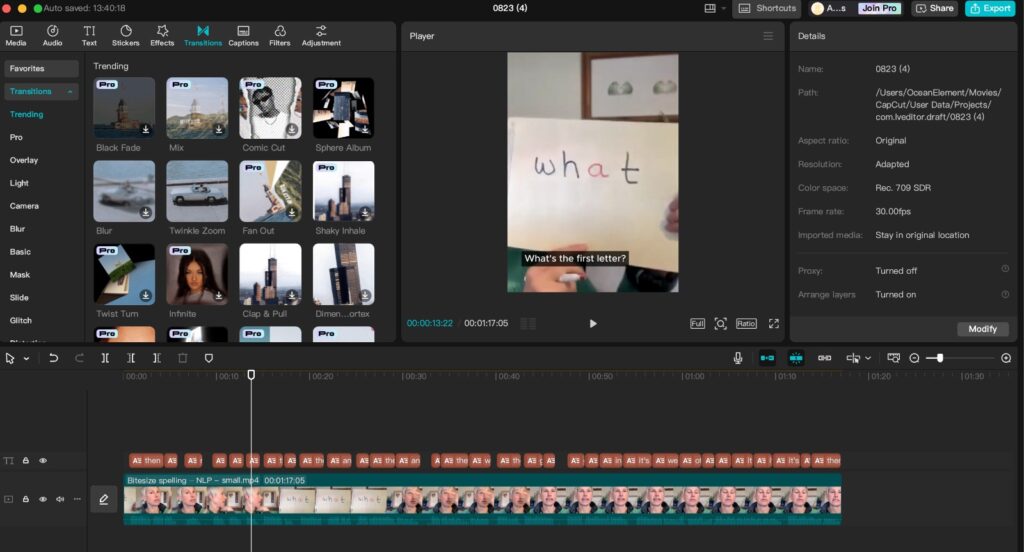
By doing this, we turned a one-hour webinar into weeks of content — a cornerstone of efficient content repurposing.
 

Step 3: Enhancing with Stock Visuals

Even the most informative talking-head video needs a visual boost. To make sure the clips would stop the scroll, we sourced stock video and imagery to complement the speaker’s points. This ensured every post was eye-catching, professional, and platform-ready and copyright compliant.


Step 4: Captioning & Creating a Searchable Transcript

Accessibility matters. We added captions so that every video could be enjoyed with or without sound — essential for modern social media management.

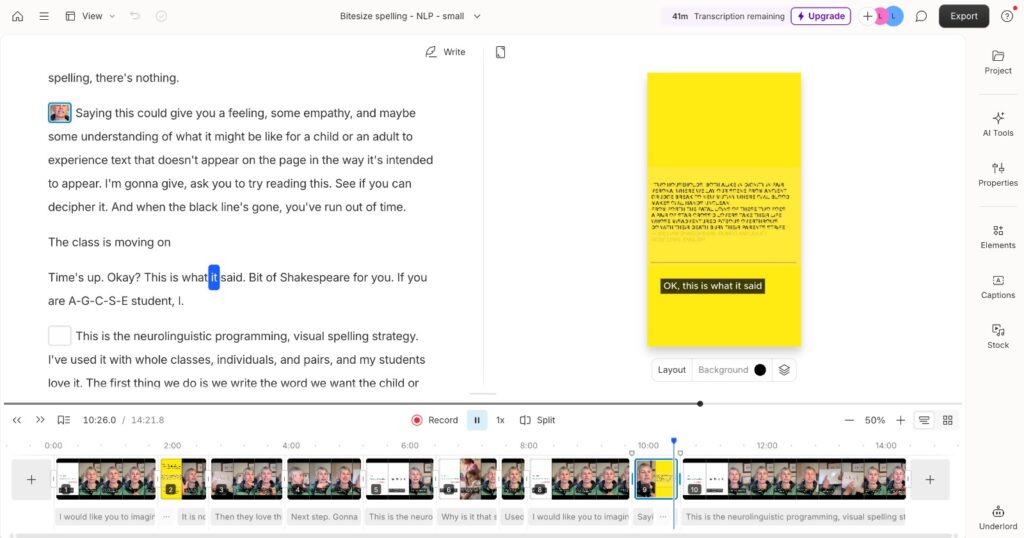
We also ran the full webinar through Descript, generating a complete transcript. This was organized into a Google Sheets content library, making it easy to search for topics or keywords. For the client, this meant no more hunting through videos — just type in “customer retention” or “lead generation” and the right clip was ready to post.


Step 5: Scheduling for Stress-Free Publishing

With dozens of polished clips prepared, we turned to Later, our client’s preferred platform, to plan and automate publishing. This gave the client a hands-free content calendar filled with high-quality posts weeks in advance.

For busy professionals, this level of virtual assistant support means peace of mind — their online presence stays consistent without daily effort.


The Result

By the end of the project, one webinar had been transformed into:

– Multiple platform-optimized videos

– Captioned, accessible content ready for silent viewing

– A searchable transcript to maximize content reuse

– Scheduled posts across social media channels

We not only provide a service that saves our clients time but also amplified their reach, turning one webinar into an ongoing social media marketing campaign – and the best part, we did all the hard work so they didn’t have to.


Why This Matters

Content repurposing is more than editing — it’s about strategically reshaping long-form insights into content that thrives on social platforms. At Popili, our virtual assistant services don’t just save time, they extend the lifespan of your content and ensure your audience engages with your message across every touchpoint.

If your business hosts webinars, podcasts, or video trainings, imagine the value they could deliver once repurposed into social media-ready content.


NEED HELP making a more efficient use of your time?

Popili Virtual Assistance can help with content creation, scheduling, and strategy so you can focus on what you do best.

Book a Free Discovery Call Today!
hello@popili-va.com | +44 (0) 7734 603411



Struggling to Let Go? A Simple Guide to Outsourcing as an SMB or Small Business Owner

Struggling to Let Go? A Simple Guide to Outsourcing as an SMB or Small Business Owner

Struggling to Let Go? A Simple Guide to Outsourcing as an SMB or Small Business Owner

There are so many benefits to being your own boss. When you run your own small business you have the flexibility and freedom to set your own schedule, choose where you work, and decide which projects or clients to take on. You’re in charge of strategy and creativity; trying new ideas or pivoting quickly; you get to shape your business vision, brand, and direction exactly the way you want it. And then there’s the unlimited growth potential in the SMB (small to medium-sized businesses) space where your income and success aren’t capped by a salary or job title.

All sounding fabulous, right? Yes, and no. 

If, like most small business owners, you’re wearing the multiple hats of founder, marketer, bookkeeper, and customer service agent it can become overwhelming pretty quickly but there’s an easy solution: outsourcing.

Outsourcing, especially for administration and marketing, can be the game changer many SMBs need. And the good news? You don’t need a team of full-time employees or a massive budget, you just need to find the right virtual assistant for you. 

Why outsourcing is easier said than done

Let’s start with the obvious: as a small business owner, you’ve built your business from the ground up. You know it inside out, and handing over any part of it can feel like you’re losing control. Then there’s the biggest stumbling block, that little voice in the back of your head saying “nobody can do it as well as you can”, whatever the ‘it’ might be.

But here’s the truth: doing everything yourself is costing you and your business in time, energy, missed opportunities and most importantly, revenue.

Many small business owners wait too long to outsource. They believe they need to be “more successful” or “better organised” before handing off tasks. Ironically, the very things they’re waiting for are often unlocked by outsourcing.

What Can You Outsource?

If you’re not ready to outsource everything, that’s okay. Start small. The goal is to reclaim time and reduce the stress of juggling too many low-impact tasks.

Here are some common areas where small business owners outsource administration:

    • Email and calendar management

    • Invoicing and bookkeeping support

    • Client onboarding and customer relationship management

    • Social media scheduling and content creation

    • Website updates and management

    • Document formatting and data entry

    • Travel arrangements and event coordination

Each of these tasks, while essential to the day to day operations of the business, doesn’t require your unique expertise. When handled by a capable virtual assistant, they can be completed quickly and efficiently, freeing you up to focus on your zone of genius.

Finding the Right Virtual Assistant

Hiring a virtual assistant doesn’t mean handing your business over to a stranger. It’s about building a working relationship with someone who compliments your strengths.

Here are a few things to consider when choosing someone to help you outsource administration and marketing:

    • Clarity: It can be hard to know where to start when it comes to delegating but the right virtual assistant will help you to figure this out. They assist in defining a list of repeatable tasks to ease the burden of day to day operations.

    • Communication: It’s worth taking the time to find a virtual assistant who understands your communication style and one who can help to build processes and procedures that work for you.

    • Experience: Look for a VA with experience working with small business owners or within your industry.

    • Security: Discuss how your data and systems will be protected. It takes time to build trust but there are tools out there to help and ensure shared data and systems are protected at all times.

Many virtual assistants specialise in supporting SMBs, and they understand the fast-paced, sometimes chaotic nature of small business life. They’re not just ticking boxes, they’re invested in your success.

The Mindset Shift: From Doing to Delegating

Outsourcing isn’t about doing less; it’s about doing more of what matters. When you hand off administrative tasks to someone reliable, you’re creating space to focus on strategy, sales, and the creative direction of your business.

It is going to feel uncomfortable at first. Delegating takes practice. You may need to document your processes or give feedback as your VA learns how you work but within a few weeks, you’ll wonder how you ever managed without them.

Start Simple. Start Smart

If you’re a small business owner struggling to let go, start with just one task. Choose something repetitive, time-consuming, or mentally draining, like feeding the social media machine with content, and outsource it.

The return on investment isn’t just measured in hours saved. It’s in peace of mind, renewed energy, and the ability to focus on the big picture. Whether you’re running a creative agency, working in construction or building a coaching network, a virtual assistant can help you scale with less stress – if you let them!

Your time is valuable. Don’t waste it on tasks someone else could do just as well, or better. Start outsourcing smartly, and watch your small business grow beyond what you thought possible.

NEED HELP GETTING STARTED?

Popili Virtual Assistance can help with content creation, scheduling, and strategy so you can focus on what you do best.

Book a Free Discovery Call Today!

hello@popili-va.com | +44 (0) 7734 603411

Social Media Made Simple: Plan a Month of Content in a Few Hours

Social Media Made Simple: Plan a Month of Content in a Few Hours

Social Media Made Simple: Plan a Month of Content in a Few Hours

Keeping up with social media can feel like a full-time job, but with the right approach, you can plan an entire month of content in a few hours. By using a simple framework, batching your content, and leveraging scheduling tools, you’ll free up your time while maintaining a strong online presence.

Stress free social media

Here’s how to make social media content planning easy and stress-free.

Step 1: Choose Your Content Pillars

Content pillars are key themes that reflect your brand’s message and keep your posts varied and engaging. Pick 3-5 pillars to focus on each month.

Example Pillars for a Service-Based Business:
Expert Tips & Advice – Share knowledge, how-to guides, or industry insights.
Behind the Scenes – Show what happens in your business, from workspaces to daily routines.
Client Wins & Testimonials – Highlight success stories or positive feedback.
Personal Stories & Values – Make your brand relatable with personal experiences or motivations.
Promotional Posts – Showcase services, offers, or upcoming launches.

Takeaway: Content pillars save time by giving you a framework to follow every month.

Step 2: Map Out Your Content Calendar

With your content pillars in place, create a simple posting schedule for the month.

Example Posting Plan:
Monday: Expert Tip
Wednesday: Behind-the-Scenes
Friday: Client Testimonial
Sunday: Promotional Offer or Personal Story

Pro Tip: If daily posting feels overwhelming, start with 2-3 posts per week. Consistency is more important than frequency.

Takeaway: A simple plan ensures your content stays balanced and engaging.

 Step 3: Batch Your Content in One Sitting

 Now that you know what to post, it’s time to batch-create content.

Quick Content Creation Tips:

Use Templates – Create branded Canva templates for easy post designs.
Repurpose Content – Turn a blog post into multiple social media posts.
Use AI & Automation – ChatGPT can help draft captions and ideas.
Write Captions in Advance – Keep them short, engaging, and action-driven.

Example: If you write four expert tips in one go, you’ve covered a month’s worth of Monday posts in minutes.

Takeaway: Batching reduces decision fatigue and makes content creation effortless.

 Step 4: Schedule Everything at Once

 Once your content is ready, schedule it for the month using a social media scheduling tool.

Top Scheduling Tools:
Meta Business Suite (for Facebook & Instagram)
Later (for visual planning)
Buffer or Hootsuite (for multi-platform scheduling)

Pro Tip: Leave space for real-time engagement, like responding to comments or sharing trending content.

Takeaway: Scheduling in advance saves time and keeps your social media consistent.

Step 5: Track & Adjust Your Strategy

Review your content at the end of the month to see what worked best.

Key Metrics to Track:
Engagement (likes, shares, comments)
Reach & Impressions
Link Clicks (for website traffic)
Saves & Shares (for value-driven content)

Adjust for next month: Focus more on what’s resonating with your audience.

Takeaway: Analysing data helps improve your content strategy over time.

Final Thoughts: Keep it Simple!

Planning social media shouldn’t be complicated. By following this simple 5-step process, you can create a month’s worth of content in a few hours, without the overwhelm.

Need Help Managing Your Social Media?

Popili Virtual Assistance can help with content creation, scheduling, and strategy so you can focus on what you do best.

Book a Free Discovery Call Today!

hello@popili-va.com | +44 (0) 7734 603411

 

The Art of Delegation: How to Work Effectively with a VA

The Art of Delegation: How to Work Effectively with a VA

The Art of Delegation: How to Work Effectively with a VA

A Guide for Business Owners to Get the Most from Their Virtual Assistant

Running a business means wearing many hats, but trying to do everything yourself can lead to burnout, missed opportunities, and slow growth. That’s where a Virtual Assistant (VA) comes in. A skilled VA can take on administrative, marketing, and operational tasks, allowing you to focus on high-value activities that drive your business forward. However, learning to effectively delegate is key to making the most of this valuable support. 

In this guide, we’ll explore how business owners can outsource work seamlessly with their VA to boost productivity and efficiency.

Why Delegation Is Essential for Business Growth

Many business owners struggle to delegate because they feel no one can do the job as well as they can, or they simply don’t have time to train someone. But delegation isn’t about losing control—it’s about freeing up your time to focus on strategy, growth, and revenue-generating tasks.

  • More time for big-picture planning
  • Increased efficiency and productivity
  • Reduced stress and burnout
  • Better work-life balance

A VA is there to support you, but clear communication and structured delegation are essential to ensuring a successful working relationship.

Step-by-Step Guide to Working Effectively with a VA

1. Define Your Needs & Priorities

Before onboarding a VA, take time to identify which tasks you need help with. Some common areas where VAs provide support include:

  • Business Operations & Executive Support – Inbox and calendar management, CRM updates, recruitment assistance
  • Marketing & Digital Presence – Social media management, content creation, website updates
  • Project & Client Management – Managing supplier relationships, coordinating teams, event planning

By listing out your biggest time-consuming tasks, you’ll gain clarity on what to delegate first.

2. Set Clear Expectations & Goals

A VA can work efficiently when they have clear direction from the start. Make sure you communicate:

– What success looks like – What are the key deliverables? How will progress be measured?
– Your preferred working style – Do you like detailed reports or quick check-ins?
–  Deadlines and priorities – What tasks are urgent, and what can wait?

Pro Tip: A weekly check-in helps keep communication open and ensures tasks stay on track.

3. Use the Right Tools for Collaboration

Working with a VA remotely requires efficient systems for communication and task management. Some essential tools include:

  • Task & Project Management – ClickUp, Trello, Asana
  • Communication – Slack, Microsoft Teams, Zoom
  • File Sharing – Google Drive, Dropbox
  • Time Tracking & Billing – Toggl, Clockify

These tools help keep everyone aligned and ensure a smooth workflow.

4. Trust Your VA & Let Go of Micromanagement

The key to a successful VA relationship is trust. If you’ve hired a professional, give them the space to work independently.

Don’t: Check in every hour or redo their work
Do: Provide feedback and allow them to improve

“Laura works both incredibly efficiently and independently. With little direction from the management team, she completes all essential tasks and proactively works on improving other areas of the business.” – Tom, Founder

A VA should be seen as a partner, not just a task-doer. Empowering them to take ownership of tasks will save you time and increase productivity.

5. Provide Regular Feedback & Adjust as Needed

Even the best working relationships need ongoing communication and refinement. Encourage:

  • Open discussions – Allow your VA to share insights or suggest improvements.
  • Regular performance reviews – What’s working well? What can be improved?
  • Flexibility – Be open to adjusting responsibilities as your business evolves.

A well-supported VA will continue adding value over time, helping your business stay organised and scale efficiently.

Unlock Your Business’s Full Potential with the Right VA

Delegation is an art, and working with a Virtual Assistant can transform how you run your business. By defining your priorities, setting clear expectations, and fostering open communication, you can build a productive and seamless working relationship that drives growth.

 Ready to delegate and take your business to the next level? Let’s discuss how Popili Virtual Assistance can help streamline your operations.

Book a Free 30 minute consultation.

hello@popili-va.com | +44 (0) 7734 603411

 

The Best CRM Tools to Stay Organised and Boost Productivity

The Best CRM Tools to Stay Organised and Boost Productivity

The Best CRM Tools to Stay Organised and Boost Productivity

In today’s fast-paced business world, staying organised is key to success. Whether you’re a small business owner, freelancer, or managing a growing team, a Customer Relationship Management (CRM) system can help streamline processes, improve client relationships, and boost efficiency. But with so many options available, how do you choose the right CRM for your needs?
In this guide, we’ll explore some of the best CRM tools that can help you stay organised, automate tasks, and manage your business with ease.

Why Use a CRM?

A CRM system helps businesses track interactions with customers, manage sales pipelines, and organise key client information all in one place. Instead of juggling spreadsheets, emails, and post-it notes, a CRM provides a centralised hub for all your business data.

Key Benefits of Using a CRM:
Improves organisation – Keeps customer details, notes, and interactions in one place.
Saves time – Automates repetitive tasks like follow-ups and reminders.
Enhances customer relationships – Helps personalise interactions and track conversations.
Boosts productivity – Keeps your team aligned with clear processes and workflows.
Increases sales efficiency – Tracks leads and opportunities effectively.

Top CRM Tools to Keep You Organised

1. HubSpot CRM – Best Free Option for Small Businesses

Ideal for: Startups, freelancers, and small businesses looking for an easy-to-use CRM.

Key Features:

  • Free forever plan with contact management, email tracking, and meeting scheduling.
  • Sales and marketing automation tools.
  • Customisable dashboards to track business performance.
  • Seamless integration with Gmail, Outlook, and other tools.

Why It’s Great: HubSpot’s free plan is one of the most powerful in the industry, making it perfect for businesses looking to get started with CRM without an upfront investment.

2. Zoho CRM – Best for Customisation

Ideal for: Businesses that need flexibility and automation.

Key Features: 

  • AI-powered analytics and sales forecasting.
  • Customisable workflows to suit different industries.
  • Multi-channel communication (email, social media, live chat).
  • Affordable pricing for small businesses.

Why It’s Great: Zoho CRM is highly customisable, making it a great choice if you need a tailored solution for your business processes.

3. Salesforce – Best for Scaling Businesses

Ideal for: Medium to large businesses looking for advanced features.

Key Features:
Highly scalable with enterprise-level automation.
AI-powered analytics and reporting.
Advanced sales and marketing tools.
Integration with over 3,000+ apps.

Why It’s Great: Salesforce is one of the most powerful CRMs available, offering endless integrations and automation. It’s perfect for businesses planning for long-term growth.

4. Pipedrive – Best for Sales Teams

Ideal for: Businesses with a strong focus on sales pipeline management.

Key Features:

  • Visual sales pipeline to track deals easily.
  • Automation of lead follow-ups.
  • Customisable reports and insights.
    Integration with Google Workspace, Slack, and Trello.

Why It’s Great: Pipedrive is user-friendly and designed for sales teams who want to improve lead tracking and conversions.

5. Trello or ClickUp – Best for Simplicity & Task Management

Ideal for: Freelancers, virtual assistants, and small teams who need basic CRM functionality.

Key Features:

  • Visual kanban boards to organise clients and tasks.
  • Custom workflows and task automation.
  • Integration with email and other productivity tools.
  • Free plans available with essential features.

Why It’s Great: If you don’t need a fully-fledged CRM, tools like Trello and ClickUp can help you manage clients, projects, and tasks in a simple and visual way.

How to Choose the Right CRM for You

Ask yourself these questions before deciding:
What’s my budget? – Do you need a free tool, or are you willing to invest?
What features do I need? – Sales tracking, automation, email integration?
How easy is it to use? – Will my team be able to adapt quickly?
Will it integrate with my existing tools? – Check compatibility with email, accounting, and marketing platforms.

Final Thoughts

Choosing the right CRM system can transform how you manage your business, saving you time, effort, and stress. Whether you’re looking for a free and simple option like HubSpot, an advanced system like Salesforce, or a visual tool like Trello, there’s a CRM to suit every business size and need.

Ready to Get Organised?

Need help implementing and managing your CRM? Popili Virtual Assistance can support you in choosing, setting up, and maintaining a CRM that works for your business.

Get in touch today to streamline your processes and stay organised!

Book a Free 30 minute consultation.

hello@popili-va.com | +44 (0) 7734 603411